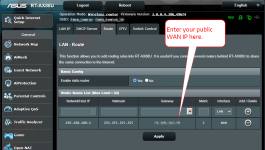
Try setting a static route to the external IP of the modem.
I've had the same problem accessing my CM1100's interface at 192.168.100.1 except that in my case, it started after I activated Ethernet Port Aggregation (LACP 802.3ad) in Feb 2022. After reading two dozen threads at least with regard to Port Aggregation on the CM1100, it seemed like that was a sacrifice to be made for using it. It made no sense, but no one seemed to have an answer.
Now months later, I see similar things happening across the board after a firmware update to the modem? I have an Asus AX88U, I added the static route using the router interface, saved the changes, powered the router off/on (this is a REQUIRED step since the reset always hangs the Asus web interface), and voila! I now have access to the CM1100's management interface again at 192.168.100.1
For everyone else who has a similar Asus router, here is a screenshot for reference!